Key Takeaways
- Bhoomi Online RTC 2026 is still the main citizen-facing route for checking Karnataka land records online, including RTC, MR, Khata Extract, i-RTC, survey services, revenue maps, mutation tools, and Mojini links through the state’s unified Revenue Department portal.
- RTC means Record of Rights, Tenancy and Crops, and in Karnataka it is commonly referred to as Pahani. The official RTC page expands RTC, while real-estate and banking explainers use RTC and Pahani interchangeably for the same land record.
- For simple viewing, use “View RTC and MR.” For an original digitally signed RTC, use the i-RTC / iWallet route, where the official portal says user accounts now require eKYC and 2-factor authentication, effective 23 June 2025.
- Mutation and Mojini are not the same thing. Mutation tracks ownership updates in revenue records, while Mojini handles sketch-related and survey-related services such as 11E sketch, alienation sketch, phodi sketch, survey document requests, and application status.
- If you want to buy land in Karnataka or sell agricultural land in Karnataka, Bhoomi is a smart first verification step, but serious buying decisions should still combine RTC, mutation, survey/sketch checks, and location clarity. That is exactly where a map-first platform like 2Bigha becomes useful.
If you are checking a village property, a farmland parcel, or inherited land, the first thing you need is not a broker’s promise. You need the record trail. That is why Bhoomi RTC Karnataka matters. It gives citizens a direct digital path to land records, mutation details, and related survey services without depending entirely on physical office visits. As of April 2026, Karnataka’s official unified portal continues to position Bhoomi as the state’s single-window land-record ecosystem under the Revenue Department.
This also explains why so many users search terms like Bhoomi Pahani download, Bhoomi RTC login, and Mojini Karnataka land records. They are usually trying to answer one practical question: What exactly should I check before I trust a land parcel? This guide answers that clearly.
What is Bhoomi Online RTC 2026
Bhoomi Online RTC 2026 refers to Karnataka’s online land-record services available through the Revenue Department’s unified portal and linked citizen services. The official portal lists services such as View RTC and MR, View Khata Extract, View RTC Information, i-RTC, I-RTC wallet, RTC with sketch, eChawadi, survey documents, revenue maps, Bhoomi online mutation services, and Mojini.
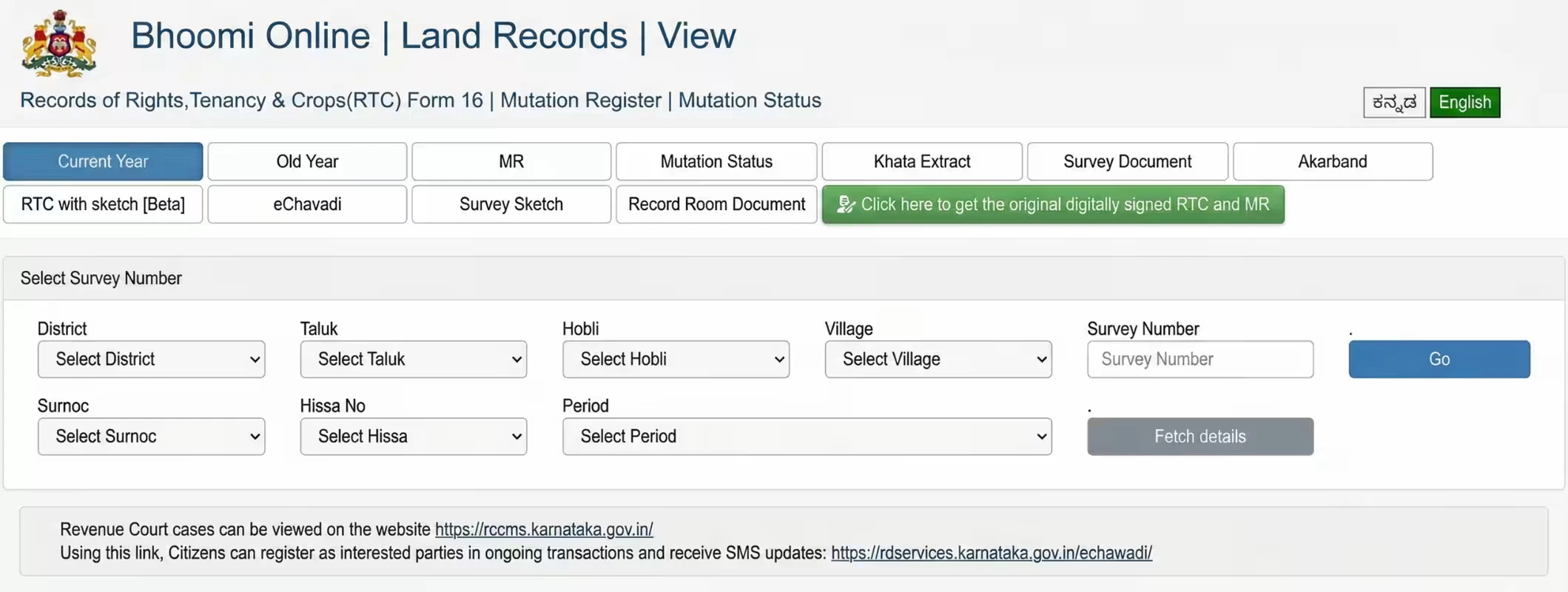
The RTC service page itself makes the scope even clearer. It identifies the document as Records of Rights, Tenancy & Crops (RTC) and also links users to MR, Mutation Status, Khata Extract, Survey Document, Akarband, RTC with sketch, eChawadi, Survey Sketch, Record Room Document, and digitally signed RTC and MR.
In simple terms, Bhoomi is not just one screen. It is a group of linked services for land viewing, record checking, mutation tracking, sketch access, and certified record download.
RTC Pahani Meaning: What are you actually checking
The official Bhoomi RTC page defines RTC as Record of Rights, Tenancy and Crops. Real-estate and banking explainers from Godrej Properties, Housing.com, and Ujjivan use RTC and Pahani for the same core land record that shows ownership and land-use related details. In practice, RTC or Pahani is the first record most people check because it helps confirm the land’s identity, current record entries, and whether the parcel details broadly match what the seller is claiming. Ujjivan’s explainer also notes that RTC is commonly used in land purchase, inheritance, loans, conversion, taxation, insurance, and dispute-related checks.
What should you use: RTC, Mutation, or Mojini
The summary below is a practical comparison drawn from Karnataka’s official unified portal, RTC page, i-RTC page, and Mojini portal, with terminology support from Housing, Ujjivan, and Godrej.
| Service | What it does | Best use case |
| RTC / Pahani | Shows the land record entry for Record of Rights, Tenancy and Crops | First-level ownership and land record check |
| MR / Mutation Status | Tracks ownership change entries after sale, inheritance, or transfer | Check whether transfer has moved into revenue records |
| i-RTC | Gives access to the original digitally signed RTC copy | When you need a certified copy for official use |
| Mojini | Handles sketch and survey-linked services like 11E, alienation, phodi, and survey document requests | Boundary, sketch, and survey workflow |
| Revenue Maps | Lets users view cadastral and geo-referenced village maps | Location context and map-based parcel understanding |
How to Check Bhoomi RTC Karnataka Online
For most citizens, the cleanest route is through View RTC and MR. The official unified portal lists this service directly, and the RTC page lets users search using district, taluk, hobli, village, survey number, surnoc, hissa number, period, and year.
A practical step-by-step flow:
- Open the official Karnataka land records portal.
- Choose View RTC and MR.
- Enter district, taluk, hobli, village, survey number, and hissa-related details.
- Fetch the record and review the land details on screen.
This is the route most users mean when they search Bhoomi RTC online check or RTC Pahani download online.
Also Read: Karnataka to Launch Fully Digital Land Surveys by 2026
Do you need a Bhoomi RTC Login
This is where many users get confused. For basic viewing, the public View RTC and MR interface is available without the same workflow as i-RTC wallet access. But for the original digitally signed RTC, the official i-RTC page recommends creating a user account and says accounts now require mandatory eKYC and 2-factor authentication, effective 23 June 2025.
The same i-RTC page says users can print the original RTC online by paying ₹10 per RTC, and it also offers payment tracking and retrieval of missed RTC prints through the iWallet system.
So the practical answer is simple:
No, not every Bhoomi check starts with login. But yes, a proper Bhoomi RTC login path matters when you want the certified i-RTC output.
Bhoomi Mutation Status: Why it matters
Mutation is the revenue-record update that reflects a change in ownership after sale, inheritance, gift, or transfer. Godrej’s explainer describes mutation as the process of updating land records after a change in ownership, and the official Bhoomi portal gives a separate online path for Mutation Status.
The mutation page allows users to search by district, taluk, hobli, village, survey number, surnoc, and hissa number. Housing also documents a similar citizen flow through View RTC and MR → Mutation Status.
For buyers, this matters because an RTC view and a mutation trail together tell a stronger story than either one alone. If a seller says the land was recently transferred, but the mutation trail is still incomplete, that is a due-diligence signal you should not ignore. Ujjivan also frames mutation tracking as a core part of land verification before purchase.
What is Mojini in Karnataka Land Records?
Mojini is Karnataka’s sketch and survey-focused digital service layer. The official Mojini portal says citizens can check application status, allotment status, view sketches, view revenue maps, and request survey-related services online. It specifically names 11E sketch, alienation sketch, and phodi sketch under the sketch-viewing workflow.
The same portal also says citizens can apply online for land survey-related requests and for survey documents such as tippan, pakka book, and atlas, while the official revenue maps page separately offers cadastral maps and geo-referenced cadastral maps, with downloadable PDF and KMZ outputs shown in the listings.
So if RTC tells you the record story, Mojini helps with the sketch and survey story. That distinction is important.
What is Current in 2026
The most useful current-update point is not a new scheme headline. It is service readiness. As of 2026, the Bhoomi Monitoring Cell pages remain live, mutation status is available online, the unified portal continues to route citizens to RTC, mutation, survey, map, and Mojini services, and the i-RTC system still reflects the eKYC + 2FA requirement introduced in mid-2025.
That means Bhoomi online services 2026 are still very much active for routine verification, record viewing, and certified RTC access.
A Smart Checklist before you Buy Land in Karnataka
Before you buy agricultural land in Karnataka, use this order:
- Check the RTC / Pahani first.
- Check mutation status if the land was recently sold, inherited, or gifted.
- Use Mojini if the issue is survey, boundary, phodi, or sketch-related.
- Look at revenue maps if you need village-level map context.
- Download the digitally signed i-RTC if you need an official copy for banks or formal use.
This is not overchecking. This is how smart buyers avoid expensive land mistakes.
Where 2Bigha Fits in
Government portals help you verify. They do not help you discover land in a modern, easy, comparison-led way. That is where 2Bigha becomes useful. If you want to buy and sell land in Karnataka, or want to invest in farmland with better location visibility, a land marketplace platform can save time before you even start deeper document verification.
In other words, use Bhoomi to verify the record trail. Use 2Bigha to explore land opportunities more intelligently.
Final Word
Bhoomi Online RTC 2026 is still one of the most practical digital land-record systems for citizens in Karnataka. Use RTC for the basic land record, mutation for ownership updates, i-RTC for certified copies, and Mojini for sketch and survey workflows. That is the right order, and it is far better than relying on verbal claims or informal screenshots.
If your goal is serious land buying or selling, start with the record. Always.
FAQs - Bhoomi Online RTC
1. What is Bhoomi Online RTC 2026?
It refers to Karnataka’s current online Bhoomi land-record ecosystem, where citizens can access RTC, MR, i-RTC, Khata Extract, survey documents, revenue maps, and linked services through the state Revenue Department portal.
2. Is RTC the same as Pahani in Karnataka?
Yes. The official portal expands RTC as Record of Rights, Tenancy and Crops, and citizen-facing explainers from Housing, Ujjivan, and Godrej use RTC and Pahani for the same land record.
3. How can I check Bhoomi RTC Karnataka online?
Go to the official portal, open View RTC and MR, enter district, taluk, hobli, village, survey number, and related parcel details, then fetch the record.
4. Do I need Bhoomi RTC login to view land records?
Not always for simple viewing. But for digitally signed i-RTC, the official i-RTC page recommends an account and states that eKYC and 2FA are mandatory for user accounts.
5. How do I check Bhoomi mutation status?
Use the official Mutation Status page and enter district, taluk, hobli, village, survey number, surnoc, and hissa details. Housing and Godrej also document this flow through the Bhoomi service menu.
6. What is Mojini Karnataka land records used for?
Mojini is used for sketch and survey-linked workflows such as 11E sketch, alienation sketch, phodi sketch, application status, survey document requests, and related map access.
7. How much does an original i-RTC cost?
The official i-RTC page states that users can print the original RTC online by paying ₹10 per RTC.
8. Is Bhoomi enough before buying land in Karnataka?
It is a strong first step, not the only step. RTC, mutation, map and sketch checks together make due diligence much safer before you commit money to a land deal.
Disclaimer: This image is for illustrative purposes only. We do not claim ownership; all rights belong to respective owners. Contact us for credit or removal.