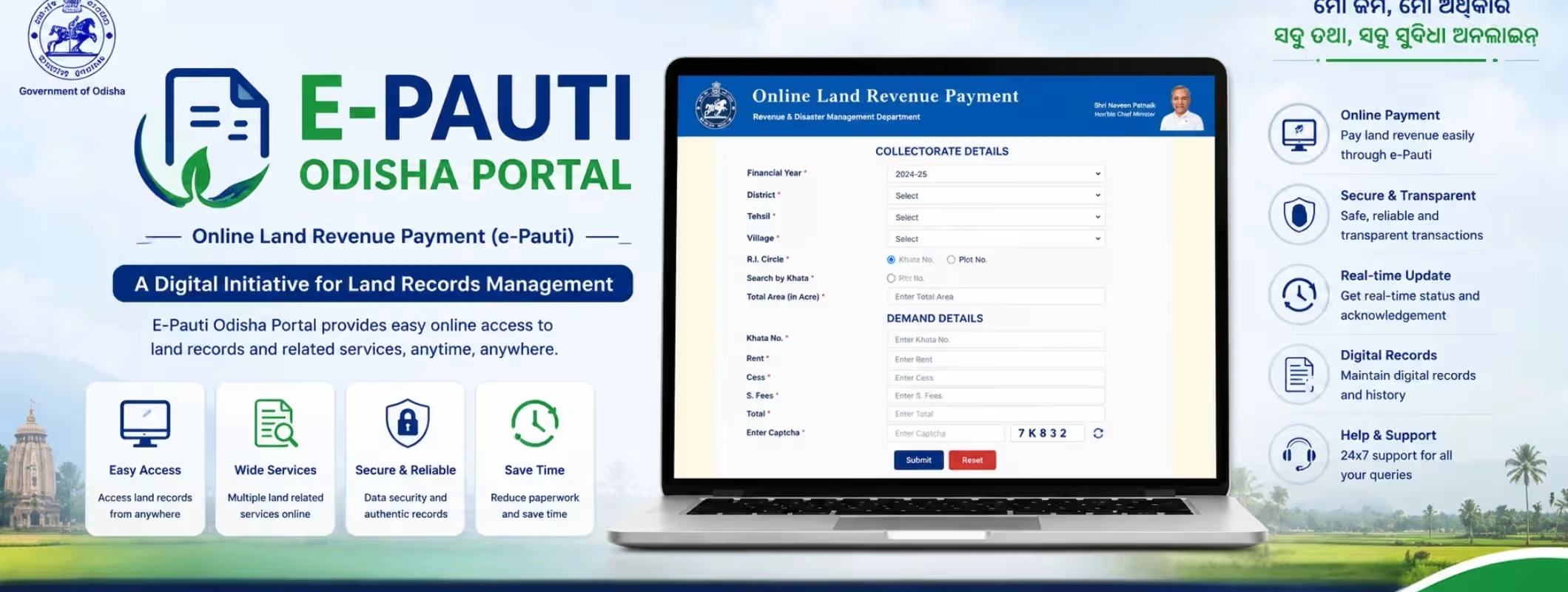
Key Takeaways
- The E-Pauti Odisha portal helps landowners pay land revenue, also called Khajana, online without visiting the land tax office.
- You can use the portal for Odisha land payment online, payment status checking, and land revenue receipt download.
- The portal is useful for landowners, farmers, buyers, sellers, brokers, and families managing ancestral land in Odisha.
- Before using the portal, keep your district, tahasil, village, and Khata number ready because these details are required on the official payment page.
- E-Pauti is mainly for land revenue payment. Municipal holding or property tax is handled through a separate Odisha property tax service.
- For buying or selling land in Odisha, online land payment records should be checked along with RoR, mutation status, land use, registry documents, and local revenue verification.
Introduction: Why E-Pauti Odisha Matters Today
Land ownership in India has always depended on clear paperwork. In Odisha, landowners often need to manage land revenue, Khajana dues, receipts, land records, and ownership details through government systems. Earlier, this usually meant visiting local revenue offices, waiting in queues, and depending on manual follow-ups.
Now, the E-Pauti Odisha portal has made the process easier by allowing citizens to complete Odisha land revenue e payment online. The National Government Services Portal lists e-Pauti as a fully online service by the Revenue & Disaster Management Department, created to help individuals pay land revenue and retrieve receipts online.
For landowners, this is not just a payment convenience. It is also a record-keeping advantage. A land revenue receipt can support ownership maintenance, land transaction discussions, family partition planning, agricultural land management, and property due diligence.
So, whether you want to pay Odisha land revenue online, download a receipt, check payment status, or understand the Odisha khajana payment process, this guide explains everything in a simple and practical way.
What is the E-Pauti Odisha Portal?
The E-Pauti Odisha portal is the official online land revenue payment platform of Odisha. It allows citizens to pay land revenue digitally instead of visiting the local revenue office for basic Khajana payment work.
The official e-Pauti portal identifies itself as an Online Land Revenue Payment platform under the Revenue & Disaster Management Department, Government of Odisha.
In simple words, if you own land in Odisha and need to pay government land revenue, the portal helps you complete the payment online and keep a digital receipt for future use.
This portal is useful for:
- Farmers paying annual Khajana
- Families managing inherited land
- NRIs or outstation landowners with land in Odisha
- Buyers checking whether land revenue is paid
- Sellers preparing documents before a land transaction
- Agents and land consultants supporting local owners
- People involved in agricultural land, plots, or rural property matters
The Odisha land revenue payment system is part of the state’s wider digital governance approach, where citizens can access land-related services through online platforms instead of relying only on offline offices.
E-Pauti Odisha Portal and Bhulekh Odisha: Are They the Same?
No, they are not exactly the same.
Many users confuse the Odisha E-Pauti portal with Bhulekh Odisha because both are connected to land records. However, their purpose is different.
PlatformMain PurposeBest Used ForE-Pauti Odisha portalOnline land revenue paymentPaying Khajana, checking payment status, downloading land revenue receiptBhulekh OdishaLand record viewingChecking RoR, Khata, plot details, ownership informationBhu Naksha OdishaMap-based land viewViewing cadastral maps and plot boundariesOdisha property tax serviceMunicipal tax paymentPaying urban holding/property tax to local urban bodies
This difference matters because many people search for Odisha bhulekh payment link when they actually need the e-Pauti payment portal. Bhulekh helps you check land records, while e-Pauti helps you make the actual Odisha land tax online payment.
Also, do not confuse land revenue with municipal property tax. The National Government Services Portal lists land revenue payment and holding/property tax payment as separate services.
Why Odisha Land Revenue Payment is Important
Paying land revenue may look like a small yearly task, but it plays a bigger role in land ownership management.
A clean land payment history helps you maintain official discipline around the property. It also makes land-related conversations smoother when you are dealing with buyers, family members, banks, local authorities, or legal advisors.
For example, if you plan to sell agricultural land in Odisha, a buyer may ask whether land revenue is updated. If you are purchasing land in Odisha, you may want to know whether the seller has pending dues. If you are managing ancestral land, updated Khajana receipts help avoid confusion among family members.
The Odisha land payment online system gives landowners a simple way to keep records updated without repeated office visits.
Who Can Use the E-Pauti Odisha Portal?
The portal is useful for anyone who has the required land details. You do not need to be highly technical. If you can identify your land record details correctly, the payment process becomes manageable.
You can use the Odisha government land tax portal if you are:
- A landowner in Odisha
- A farmer paying land revenue
- A family member managing inherited land
- A person living outside Odisha but owning land in the state
- A buyer verifying land payment history
- A seller preparing land documents
- A real estate consultant or property service provider
- A person handling land records for agricultural, residential, or rural property
However, payment should be made carefully. Wrong land details can create confusion, so always verify the Khata and village details before making any payment.
Details Required Before Making Odisha Land Payment Online
Before starting the E-Pauti Odisha login or payment process, keep your basic land details ready. The official payment page asks users to select or enter land-related information such as district, tahasil, village, and Khata number.
Here is a simple checklist.
Required DetailWhy It MattersDistrictHelps locate the correct revenue jurisdictionTahasilConnects your land to the correct local revenue officeVillageIdentifies the exact revenue villageKhata NumberHelps fetch the correct land accountCaptchaConfirms human access before submissionPayment MethodNeeded to complete digital paymentMobile/Email, if askedUseful for communication or receipt tracking
You should also keep your land record copy, old Khajana receipt, or RoR details nearby. This reduces the chance of selecting the wrong record.
How to Pay Land Tax in Odisha Online: Step-by-Step Guide
The Odisha khajana payment process is straightforward if you have the right land details. Here is a simple step-by-step explanation.
Step 1: Visit the Official E-Pauti Odisha Portal
Go to the official e-Pauti portal of the Odisha Revenue & Disaster Management Department. The official portal shows options such as Pay Land Revenue and Know Payment Status & Download Receipt.
Always use the official portal for payment. Avoid random third-party links when making government land payments.
Step 2: Select “Pay Land Revenue”
Choose the option for land revenue payment. The official payment page displays online land revenue payment for the relevant financial year. When accessed, the page showed payment for the financial year 2026–27.
Step 3: Enter Land Details
Now enter or select the required land information.
You may need to provide:
- District
- Tahasil
- Village
- Khata number
These details help the system identify your land account. If the Khata number is wrong, the payment information may not match your property.
Step 4: Check Demand Details
Once land details are fetched, the portal may show demand details such as rent, cess, water tax, and total amount. The official payment page includes fields for water tax, rent, cess, N cess, and total demand.
Check the amount carefully before moving ahead.
Step 5: Complete Captcha Verification
Enter the captcha shown on the screen. This is a basic security step.
Step 6: Make the Online Payment
Choose the available payment option and complete the transaction. After payment, save the transaction reference number.
Do not close the browser immediately if the payment is processed. Wait until the portal confirms the transaction or redirects you to the receipt/status page.
Step 7: Download or Save the Receipt
After successful payment, download the land revenue receipt. This receipt is important for future reference, land transaction support, and personal records.
Also Read: Odisha Launches QR Code Land Records: How It Makes Buying Land Safer in 2026
How to Download Odisha Land Revenue Receipt Online
The Odisha land revenue receipt download option helps users retrieve proof of payment. The official e-Pauti portal has a separate option for Know Payment Status & Download Receipt.
Usually, you may need transaction details or land information to check the receipt. The National Government Services Portal also states that e-Pauti supports retrieval of transaction numbers and later receipt downloads if users misplace receipts or need transaction details.
Keep these details safe after payment:
- Transaction ID
- Khata number
- Payment date
- District and tahasil
- Downloaded receipt copy
- Bank payment confirmation
A receipt is not just a payment slip. It is useful supporting proof that your land revenue payment has been made.
How to Check Odisha Land Payment Status
You can use the payment status option on the e-Pauti portal to confirm whether your transaction was successful. This is helpful if money is deducted from your bank account but the receipt is not immediately generated.
At times, specific services may show maintenance messages. When checked, the receipt/status page redirected to a message saying the service was temporarily stopped for land revenue calculation for the new financial year 2026–27 and would be available soon.
So, if the status or receipt option does not work immediately, do not panic. Save your bank transaction details and try again later through the official portal.
E-Pauti Odisha Payment: Common Mistakes to Avoid
Online land payment is simple, but small mistakes can create unnecessary problems. Use this checklist before making payment.
MistakeWhy It Can Create ProblemsWhat to Do InsteadEntering wrong Khata numberPayment may not match the intended land recordCross-check with RoR or old receiptSelecting wrong villageSimilar village names can confuse usersConfirm district, tahasil, and village carefullyClosing browser during paymentReceipt may not generate immediatelyWait for confirmationNot saving transaction IDDifficult to track failed or pending paymentSave screenshot and transaction referenceTreating land revenue as property taxThese are different payment categoriesUse e-Pauti for land revenue and municipal service for property taxDepending only on payment receipt for buying landReceipt does not prove complete legal ownershipVerify RoR, mutation, registry, encumbrance, and local records
E-Pauti Odisha Portal Benefits
The E-Pauti Odisha portal benefits are practical for both landowners and land buyers.
1. Saves Time
You do not need to visit the land tax office for basic Khajana payment. This helps especially when the landowner lives outside the village, district, or state.
2. Supports Digital Record Keeping
A downloaded receipt is easier to store, share, and retrieve. This helps during land sale discussions, family settlements, and documentation checks.
3. Reduces Manual Dependency
Digital payment reduces the need to depend on middlemen for simple land revenue payment.
4. Useful for Buyers and Sellers
Before buying land, buyers can ask sellers for updated land revenue receipts. Before selling land, sellers can clear dues and keep payment proof ready.
5. Helps in Faster Land Due Diligence
The portal does not replace legal verification, but it supports one part of the land checking process. When combined with RoR, mutation status, registry papers, and local tahasil verification, it gives better clarity.
Odisha Land Payment Online and Property Transactions
If you are planning an Odisha property transaction process, land revenue payment is one important checkpoint. It should not be ignored.
For buyers, updated land payment records can indicate that the landowner is actively maintaining revenue obligations. For sellers, a clear payment record can build trust during negotiation.
However, buyers should remember one thing clearly: a land revenue receipt alone does not prove clean title. It is only one supporting record. You must also check ownership, mutation, encumbrance, land use, access road, boundary, litigation risk, and registry history.
This is especially important when dealing with:
- Odisha land for sale
- Agricultural land near growing towns
- Rural plots
- Family-owned land
- Inherited land
- Land with shared ownership
- Land being sold through agents
- Properties near highways, industrial areas, or tourism zones
For serious land buyers, due diligence should always come before payment commitment.
Role of E-Pauti in Buying Agricultural Land in Odisha
If you want to buy agricultural land in Odisha, you need to understand the land record ecosystem. Odisha has many land categories, ownership patterns, and local revenue rules. A buyer should not depend only on verbal claims.
Before buying agricultural land, check:
- RoR or Record of Rights
- Khata and plot details
- Mutation status
- Land revenue payment history
- Seller identity and ownership share
- Boundary and access road
- Land use restrictions
- Local revenue office verification
- Registry feasibility
- Any dispute or family objection
The Odisha land records payment system can help you verify whether land revenue has been paid, but complete property verification still needs a wider document check.
Selling Land in Odisha? Keep These Documents Ready
If you want to sell land in Odisha online verification becomes very important. Serious buyers ask questions. They want proof. They want clarity. They want fewer surprises.
Before listing land for sale, keep these ready:
- Updated RoR copy
- Old and latest land revenue receipt
- Mutation documents
- Registry documents
- Identity proof of owner
- Family consent, where needed
- Boundary details
- Road access proof
- Land photos and location details
- Local valuation understanding
A seller who keeps documents ready usually gets better buyer confidence. This is where digital platforms can help.
How 2Bigha Helps Buyers and Sellers in Odisha Land Transactions
For land buyers and sellers, 2Bigha can make the discovery and verification journey more organized. Instead of depending only on scattered local contacts, users can explore land opportunities with better location clarity and structured property details.
For buyers looking for agricultural land, farmhouse land, or rural plots, 2Bigha helps by making land discovery more transparent. Map-based listings can make it easier to understand location, nearby access, and the broader land context before shortlisting a property.
For sellers, 2Bigha helps present land more professionally with proper details, location-based visibility, and a cleaner buyer journey. If you are planning to list Odisha land for sale, a platform-led approach can save time and improve trust. A subscription plan can also support serious sellers, agents, and property professionals who want better visibility.
Still, land buyers should always verify government records, local revenue documents, ownership papers, and payment receipts before closing any deal.
E-Pauti Odisha vs Offline Land Tax Office
FactorE-Pauti Odisha PortalOffline Land Tax OfficeConvenienceCan be used onlineRequires physical visitTime RequiredFaster for basic paymentMay take longer due to queuesReceipt AccessDigital receipt can be downloadedPhysical receipt may need manual handlingBest ForRoutine land revenue paymentComplex corrections, disputes, unclear recordsUser DependencyNeeds basic digital accessDepends on office process and staff availabilityRecord ManagementEasier to save and sharePaper records can be misplaced
The online system is best for simple payments. For disputes, wrong records, ownership mismatch, or mutation issues, you may still need to visit the local revenue office or take legal help.
Is E-Pauti Odisha Safe for Online Payment?
Yes, when you use the official portal and verify all details carefully, it is a safer and more convenient way to make digital land payment Odisha.
To stay safe:
- Use only the official e-Pauti portal
- Do not make payment through unknown links
- Do not share OTP with anyone
- Check land details before payment
- Save receipt and transaction ID
- Use your own secure device
- Avoid public Wi-Fi for payment
- Keep screenshots of confirmation pages
Government payment systems can sometimes face downtime or maintenance. If payment status is not immediately visible, wait and recheck using official receipt/status options.
Quick Summary Table
User QuerySimple AnswerWhat is E-Pauti Odisha?It is Odisha’s online land revenue payment portal.Can I pay Khajana online in Odisha?Yes, through the e-Pauti portal.What details are needed?District, tahasil, village, Khata number, and payment details.Can I download the receipt online?Yes, the portal provides status and receipt download options.Is it the same as Bhulekh Odisha?No. Bhulekh is for land records; e-Pauti is for land revenue payment.Is property tax the same as land revenue?No. Municipal property tax and land revenue are different services.Is a receipt enough for buying land?No. Verify RoR, registry, mutation, encumbrance, and local records too.
Final Thoughts
The E-Pauti Odisha portal has made Odisha land revenue payment simpler, faster, and more accessible. For landowners, it reduces the need for repeated office visits. For buyers and sellers, it adds one more layer of transparency during land-related discussions.
But it should be used wisely. A land revenue receipt is important, but it is not a complete ownership guarantee. If you are buying or selling land in Odisha, combine e-Pauti payment checks with Bhulekh records, mutation verification, registry review, boundary inspection, and local revenue office confirmation.
For a smoother land discovery and selling experience, platforms like 2Bigha can help users explore land opportunities with better structure, location clarity, and digital-first convenience. In today’s property market, transparent information is not optional. It is the base of a safer land transaction.
FAQs - E Pauti Odisha Portal
1. What is the E-Pauti Odisha portal?
The E-Pauti Odisha portal is the official online platform for paying land revenue in Odisha. It helps landowners pay Khajana online, check payment status, and download land revenue receipts through a digital process.
2. How can I pay Odisha land revenue online?
You can pay Odisha land revenue online by visiting the e-Pauti portal, selecting Pay Land Revenue, entering district, tahasil, village, and Khata details, checking the demand amount, completing captcha, and making the payment online.
3. Can I download the Odisha land tax receipt online?
Yes. The e-Pauti portal provides an option to check payment status and download the land revenue receipt. Keep your transaction details safe because they may be needed to retrieve the receipt later.
4. Is E-Pauti Odisha the same as Bhulekh Odisha?
No. Bhulekh Odisha is mainly used to check land records such as RoR, Khata, and plot details. E-Pauti Odisha is used to pay land revenue online and download payment receipts.
5. Is land revenue receipt enough to buy land in Odisha?
No. A land revenue receipt is only one supporting document. Before buying land in Odisha, you should also verify RoR, mutation status, registry records, ownership chain, encumbrance, land use, boundary, road access, and local revenue office records.